Based in Singapore · Open to opportunities

Automation / AI / Digital operations

Hi, I'm Sai Prakash.

Practical systems.
Better working days.

I turn spreadsheets, repetitive tasks, and disconnected tools into useful business systems. From the first workflow sketch to the live website.

A focused software workspace with code on a desktop monitor and laptop
From an everyday problem
to a working solution.
Built for the people doing the work.Scroll to discover
Excel & VBAPython & SQLMicrosoft 365Power PlatformAI & APIsCloudflare
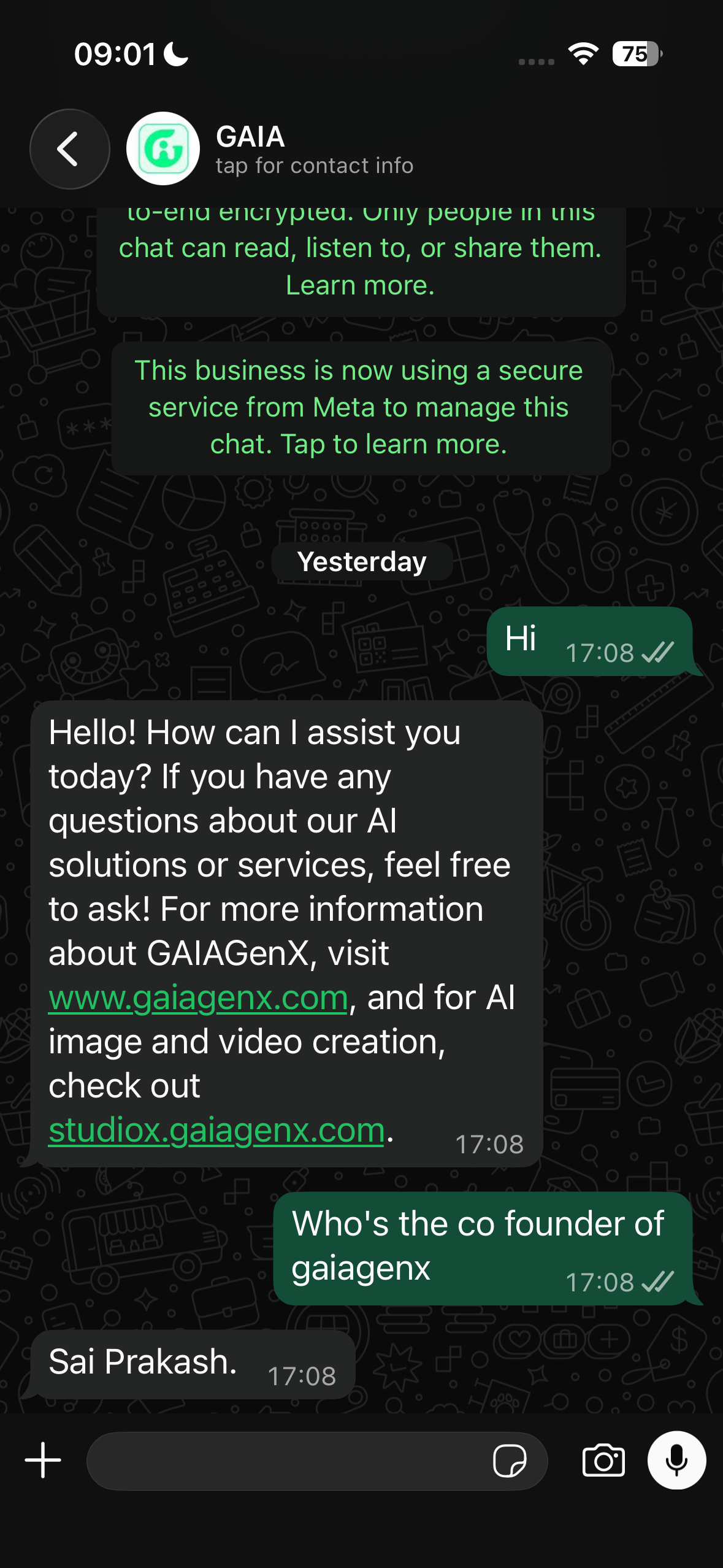
Live WhatsApp conversation showing the GAIA AI agent answering company questions
Live response from the GAIA business WhatsApp agent.

GAIAGenX WhatsApp AI Agent

I built the production webhook and response workflow behind this agent: verified WhatsApp events enter a Cloudflare Worker, company questions receive controlled answers, AI handles broader enquiries, D1 preserves conversation context, duplicates are suppressed, and uncertain requests can be handed to the owner.

  • Live inbound WhatsApp webhook
  • Deterministic company knowledge
  • AI replies with conversation history
  • Duplicate protection and human handoff

Try the live WhatsApp agent

Made to be used.
Ready to explore.

AI products and business websites I have built. Open a site and inspect the work directly.

Not occasional use.
An operating discipline.

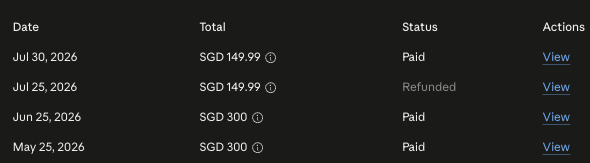
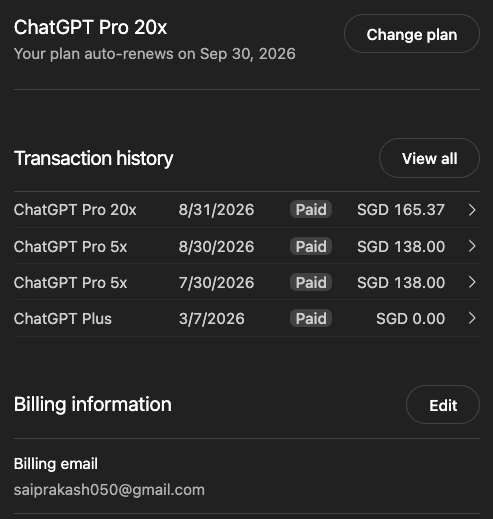
I work with advanced AI tools for hours every day across research, coding, automation, evaluation and deployment. The subscriptions show sustained practice; the live systems throughout this portfolio show what that practice produces.

≈ S$300invested personally each month in advanced AI toolsS$297.84 four-month average from the supplied paid records. Refunded charges are excluded.
  • BuildAgents, workflows, internal tools and production interfaces
  • EvaluateModels, prompts, tool use, failure modes and output quality
  • OperateDaily work from first idea through testing and deployment

Investment supports the practice. Shipped work is the proof.

01ClaudePersonal billing history
Claude personal billing history showing paid charges in Singapore dollars
Paid records include S$300 billing cycles.
02ChatGPT Pro + CodexPersonal billing history
ChatGPT Pro billing history used for daily Codex work, including the visible billing email
Recent paid Pro usage across multiple capacity tiers.

Complex workflows.
Simple to operate.

Four complete browser demonstrations covering invoice control, field time, AI-assisted timesheet review and scheduled absence reporting.

Interactive sanitized demonstration

One invoice in.
Twenty-seven checks handled.

Start the supplied fictional invoice and watch the complete clean path at a deliberate pace: evidence capture, identity and duplicate controls, date and tax rules, controlled filing, Excel-style register rebuild, fictional accounting posting and read-back, NAS mirroring, bank matching and audit close.

27 paced checks

5 inspectable outputs

1 click clean sample run

JavaScript · AP controls · Excel-style reporting · accounting connector · storage reconciliation · audit trail

Open the working invoice demo
FA /Foundry AP Control27-check live run
  1. 01
    Capture the evidenceSource PDF · fingerprint · structured fields
  2. 02
    Apply business controlsScope · identity · dates · duplicate · tax · coding
  3. 03
    Build register & filingFilename · folders · workbook · formulas
  4. 04
    Post and verifyPayload · expense · voucher · receipt · read-back
  5. 05
    Reconcile and closeNAS · bank · fee check · reminder · audit

Fictional data · virtual systems · no external posting

Interactive project built by Sai Prakash

Clock twice.
The sheets build themselves.

Clock in once, let the demonstration move to the evening time, clock out, then build the timesheet and calculation sheet. Eight automatic controls calculate elapsed, break, regular and overtime hours with no note or approval form.

4 obvious actions

8 paced controls

2 ready outputs

Clock events · timesheet rules · overtime calculation · CSV output

Open the working MarineTime demo
M /MarineTimeFour-action live run
  1. 1
    Record the shiftClock in · automatic evening time · clock out
  2. 2
    Build automaticallyPair · validate · break · regular · overtime
  3. 3
    Open the outputsDaily timesheet · calculation sheet · CSV

Fictional browser demonstration · no payroll write

Interactive project built by Sai Prakash

One document in.
A finished sheet out.

Click once to read the supplied timesheet, structure every row, validate the source, apply shift rules, calculate 24 regular and 4 overtime hours, and build spreadsheet-ready output. Seven controls remain visible while the work completes automatically.

7 paced controls

1 click automatic run

CSV calculated output

Document extraction · source validation · hour calculation · spreadsheet export

Open the working Timesheet Lens demo
TL /Timesheet LensOne-click live run
Sample documentExtracted rowsShift rules
Seven automatic controlsRead, structure, validate, calculate and build.
Source matchHour totalsCalculated CSV

Fictional data · deterministic browser processing · no external AI call

Interactive project built by Sai Prakash

One sync.
Everyone accounted for.

Click once to join six active employees to five clock events and one approved leave record. The workflow calculates daily status, confirms zero unresolved people and refreshes a 30-day attendance report automatically.

3 joined sources

7 paced controls

0 unresolved records

Scheduled workflow · Excel-style joins · leave matching · attendance reporting

Open the working Attendance Signal demo
AS /Attendance SignalOne-click live run
Employee rosterFive check-insApproved leave
Join, match & calculateAccount for every person automatically.
Daily registerZero unresolved30-day report

Fictional people · browser-only processing · no external message

Hard problems behind me.
One clear action in front.

These are systems I designed for my own daily work. Each one hides the integrations, controls and edge cases behind a deliberately simple interface.

SP/VNative macOS product · Source available on request

SP Voice

Hold a hotkey, speak, release. Finished text appears in the app I was already using.

VoiceUseful textAny app
What is complex underneath?

The app remembers the focused target, records clean audio, routes transcription through cloud or local models, optionally polishes the result, then verifies insertion through macOS Accessibility APIs. Electron and browser editors get a hardened paste path, provider failures can fall back safely, and credentials stay in Keychain.

Simplified to: one press-and-hold gesture, a menu-bar status, and four useful modes. The earlier VoicePolish prototype proved the pipeline; SP Voice hardened it into an installed, signed product.

Swift · AppKit · AVFoundation · Accessibility · local AI
Installed local program · Source code available on request
A professional using voice dictation while working on a laptopSP Voice app iconSP VoiceSpeak. Release. Continue working.

C/VCODEX VAULTREAD ONLY
DAILY DECISION BRIEFRisk first.
Noise second.
Signals, holdings and evidence in one view.
DATACONNECTEDACTIONSHUMANAUDITVISIBLE
C/VLive personal dashboard

Codex Vault

A personal capital and market-signal operating system that turns scattered data into one readable decision brief.

What is complex underneath?

It combines brokerage snapshots, timestamped manual sources, foreign exchange, portfolio concentration, 200-day trend regimes, research evidence and two independent paper systems. Source freshness and system health stay visible, while the interface remains read-only and never places an order.

Simplified to: open one dashboard, read the attention queue, inspect the evidence, and keep every financial decision human.

Open live Codex Vault Live data · risk controls · audit trail · responsive PWA
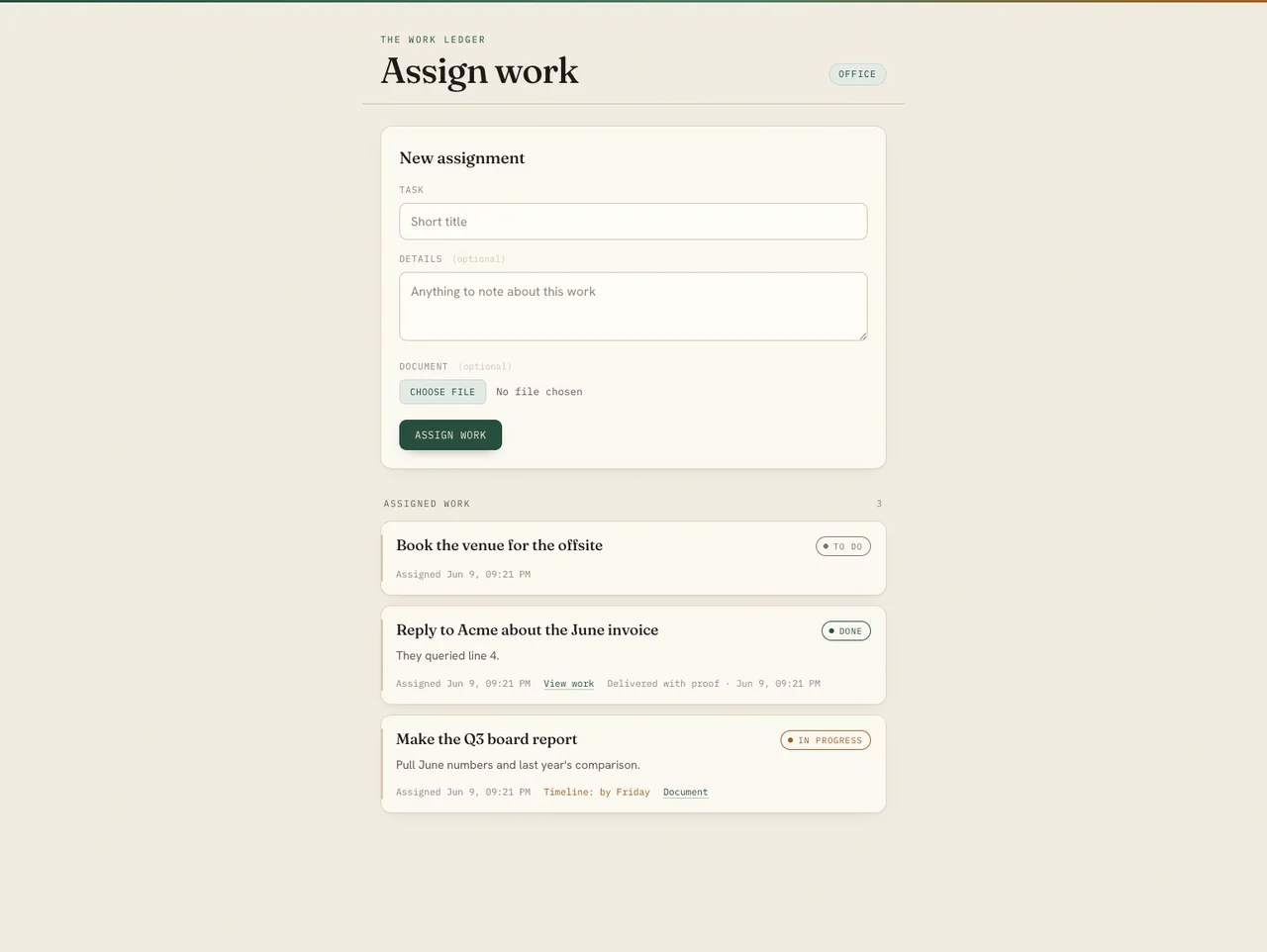
Office Tasks work ledger showing an assignment form and work history
OT/Cloudflare Pages · D1 · R2

Office Tasks

A shared work ledger with two role-specific views: one person assigns the task and files; the other completes it with proof. Every closed item remains searchable instead of disappearing into chat.

Complexity made simple

Private role links, durable database state, object storage, file delivery, status transitions and history sit behind a three-step loop: assign → work → close with proof.

Private program developed by me · Visual proof shown here · Source code available on request
TD/Live password-protected web app

Tasks Dashboard

A mobile-ready personal task board for creating sections, adding and editing work, marking it complete, and scheduling phone reminders from the same screen.

Complexity made simple

A Cloudflare Function keeps credentials server-side, proxies the Vikunja API, registers project webhooks, and ensures deleting or changing a task also changes its reminder. The visible experience is only a clear list, a due time and one Add button.

Open the live login screen
FO/Installed macOS app · Web reader

Folio

A lossless reader and editor for Markdown and more than sixty text and code formats. Double-click a file in Finder; Folio opens, renders it offline, and can save back in the original encoding.

Complexity made simple

Encoding detection, strict sanitisation, table fidelity, local-link resolution, single-instance file handling, reliable window activation and native menus become one ordinary action: double-click the document.

Try the web reader
QB/Native Swift menu-bar utility

AI Quota Bar

A glanceable view of the real session, weekly and per-model limits exposed by Claude and Codex. Every gauge shows what remains, not an estimate of what was used.

Complexity made simple

Provider-specific payloads, subscription states, token recovery, exponential backoff, last-good caching and changing quota buckets are normalised into two menu-bar numbers and a clear drill-down.

Installed local program · Source code available on request
RS/Private self-hosted system

Reminder Stack

A reliable personal task and reminder service that can turn a due date, webhook or long-horizon schedule into a secure phone notification.

Complexity made simple

Vikunja, PostgreSQL, ntfy, Caddy, a small Python event bridge, scoped publisher identities and cron schedules run as separate services. To the user it is simply: record the reminder and receive it at the right time.

Private self-hosted program · Source code available on request
SD/Read-only Mac utility

Storage Dashboard

A visual map of every large file and folder on the Mac, grouped by what it is and how risky it would be to remove.

Complexity made simple

A read-only scanner walks the home folder, constructs a nested size tree and applies safety rules for cloud-synced data, app state, credentials, caches, build artifacts and personal media. It never deletes anything; it turns raw disk usage into a safe review order.

Local read-only program · Source code available on request

What connects these builds: I take a many-step technical system—APIs, local apps, databases, cloud services, AI models, permissions and failure handling—and give the user one obvious next action.

At the desk. In the field.
Behind the systems.

Different settings. The same need for clear information and dependable tools.

Business reports, charts, a pen and calculator arranged on a desk
01 / Data & decisionsMake the numbers useful.Excel automation · reporting · validation
Port worker using a tablet beside dockside cranes
02 / Field operationsKeep the team connected.Timesheets · approvals · mobile workflows
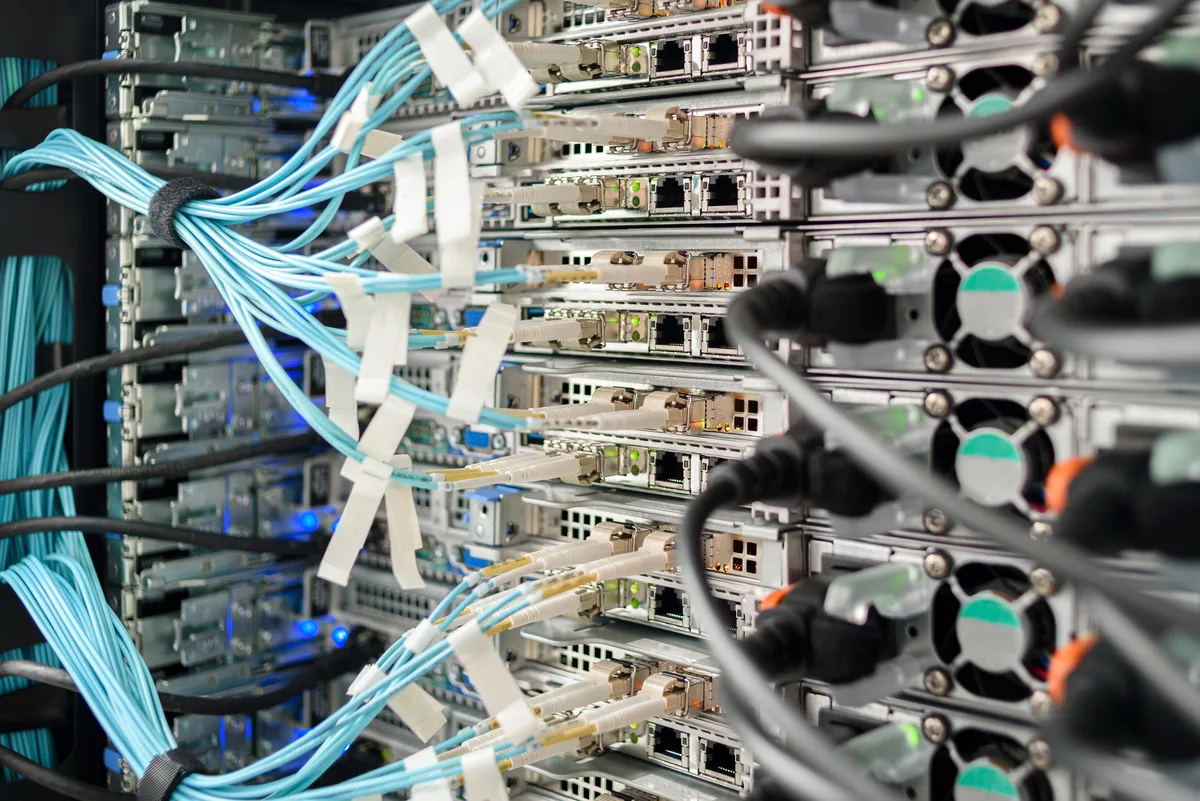
Close-up of connected servers and blue network cables
03 / Digital foundationsConnect the moving parts.Hosting · integrations · practical IT

Illustrative photography of the working environments these tools support.

Build files,
in one place.

The unique inspection files from my former technical portfolio now live here. Repeated project descriptions and demonstrations have been removed.

01 / Excel & VBA

Digital Operations Command Center

Six-sheet workbook for recruitment, onboarding, administration SLAs and executive reporting, with inspectable VBA automation.

02 / Reporting & workflow

Power Platform implementation packs

Joinable workforce data, Power Query, DAX and dashboard specifications, plus a controlled Microsoft 365 onboarding flow.

03 / Controlled AI & IT

Productivity and diagnostics packs

Human-approved AI workflow controls, evaluation cases and privacy rules, together with deterministic office IT diagnostics and recovery runbooks.

04 / Additional workbook proof

Operations automation demonstration

A second sanitized Excel dashboard with validation, reporting and export logic, paired with its readable macro source.

Sanitized reference files for inspection. Production credentials, employee information, customer data and private repositories are not published.

From the first question
to the final handover.
SP / BUILD NOTES
The craft behind the workflow.

Understand it.
Build it.
Make it work.

  1. 01
    Start with the real process.

    Find the repeated steps, the missing information, and the people who need the result.

  2. 02
    Build something useful.

    Connect the right tools. Keep exceptions visible and approvals in human hands.

  3. 03
    Test, document, hand over.

    Check the outputs and leave a system that someone else can operate.

Singapore's Marina Bay skyline illuminated at dusk
Singapore, where I work and build.

Curious about the problem.
Accountable for the result.

I enjoy the practical side of technology: understanding how a team works, finding the repeated steps, and building something that makes the next day easier.

That includes the less visible work: checking the data, handling exceptions, setting up hosting, documenting the system, and helping people use it.

Open to hands-on automation, AI & IT roles

Let's make the
next workflow better.

WhatsApp +65 8659 9540
Get my résumé